ASCII Art from Scratch
October 12, 2025Prologue
I was wondering for a while about how ascii-art generators map pixels to letters, and thought of giving it a go, with a very basic understanding of how it should happen. A lot of simple generators out there just use a hardcoded string of characters sorted by vibe and intuitive brightness, like " .:-=+*#%@". While that works as a quick hack, it isn't super precise, or experimental. Different fonts render characters with entirely different weights, shapes, and aspect ratios.
I wanted to fix that. In this post, I built an intelligent (debatable), highly accurate ASCII art generator. It dynamically calculates the absolute visual weight of characters from a real monospaced font (UbuntuMono-Regular.ttf), maps them to a normalized 0.0 to 1.0 scale, and turns any monochrome image into a beautiful textual masterpiece.
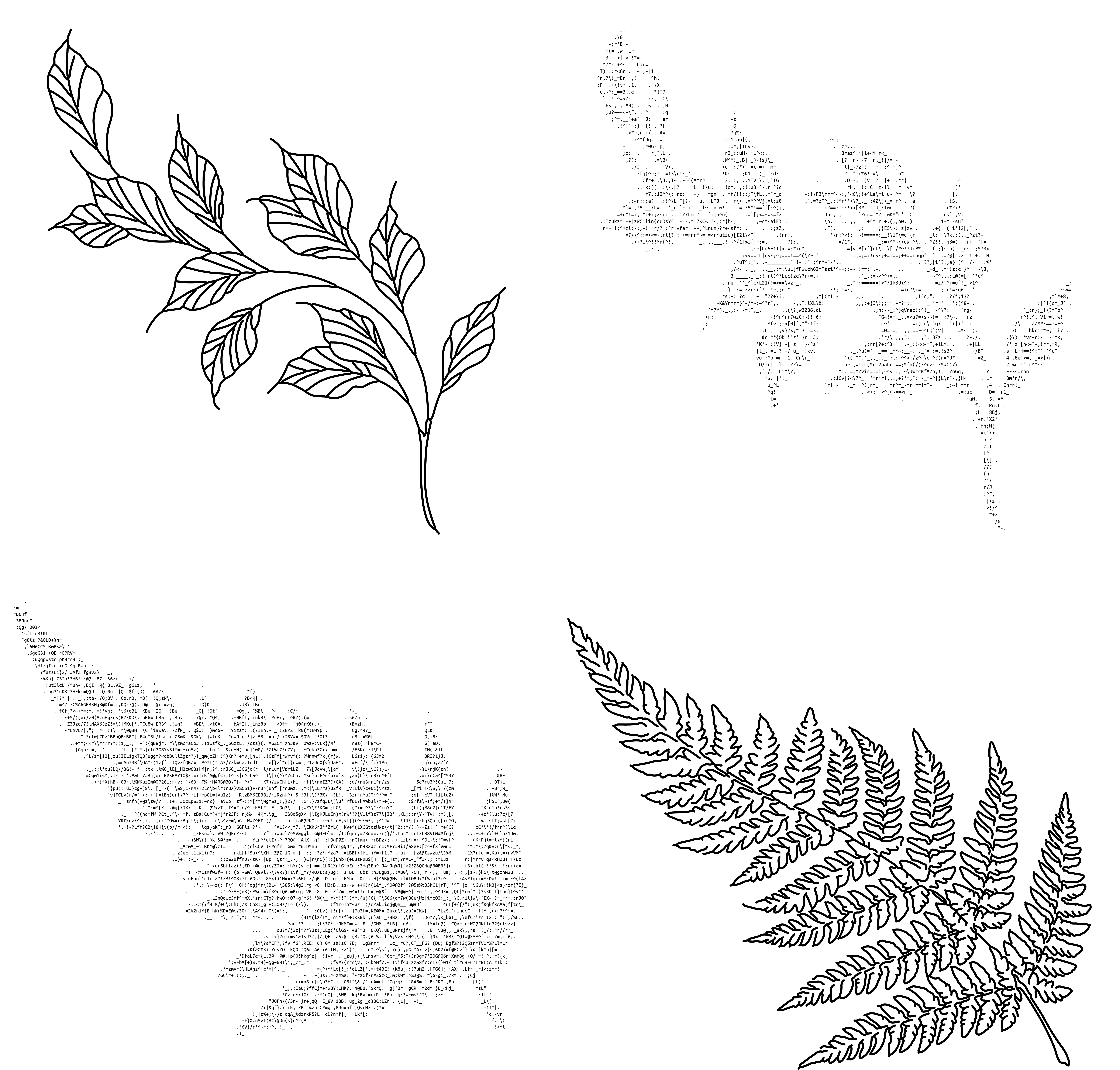
The Core Concept
The game plan has five key milestones:
- Extracting Font Glyphs: Reading the TrueType font (
.ttf) file to grab all the printable characters. - Measuring Glyph Densities: Rendering each character onto a temporary canvas using
Pillowand calculating the exact percentage of pixels filled. - Normalization: Scaling those weight values smoothly across a interval.
- Image Preprocessing: Tweaking the source image size, stretching or shrinking it to account for the font's tall character aspect ratio.
- Pixel Mapping: Matching individual pixel lightness values against our calculated character densities using a nearest-neighbor approach.
Phase 1: Environment Setup & Extracting Glyphs
First, we need to install our dependencies. We will use fonttools to look inside the font's internal character mappings (cmap), and Pillow to handle all the image and text rendering.
pip install fonttools pillow
Next, I loaded the font and read all available characters. TrueType fonts organize their mappings in internal tables. I looped over these tables to extract valid Unicode values and filter out things I can't print.
import sys
from fontTools.ttLib import TTFont
from PIL import Image, ImageDraw, ImageFont

# Load the TrueType Font
ttf = TTFont("UbuntuMono-Regular.ttf")
characters = set()

# Extract printable characters from font tables
for table in ttf['cmap'].tables:
    for code, _ in table.cmap.items():
        char = chr(code)
        if char.isprintable():
            characters.add(char)
Refining the Dataset
Extracting every single valid character from modern fonts can pull in thousands of weird Unicode glyphs, math operators, and other stuff that screw up our density curve, and/or look weird. To clean this up, we write all the characters into a text file, characters.txt, review it manually and delete the unnecessary characters.
with open("characters.txt", "w") as f:
    for char in sorted(characters):
        f.write(f"{char}\n")
After a few minutes of silent manual reviewing, we then import the file and read the characters that survived the plague, that is us.
with open("characters.txt", "r") as f:
    lines = f.readlines()

# Clean and sort our curated character set
characters = sorted([line.strip() for line in lines if line.strip()])
Phase 2: Calculating Exact Character Fill Percentages
Now for the fun part. Instead of guessing how "bright" a character is, we render each one onto a black canvas, color the text in pure white (255), and find the sum of all pixel values. This will be our grey value, that we'll use to map to the pixels.
# Initialize the font structure at a readable point size
font = ImageFont.truetype("UbuntuMono-Regular.ttf", 20)

ascent, descent = font.getmetrics()
canvas_height = ascent + descent

result = []

for char in characters:
    char_width = font.getlength(char)
    width = int(round(char_width))
    height = int(round(canvas_height))

    # Catch edge cases where a glyph might be empty
    if width == 0 or height == 0:
        result.append((char, 0))
        continue

    # Render glyph onto a monochrome black canvas
    image = Image.new("L", (width, height), color=0)
    draw = ImageDraw.Draw(image)
    draw.text((0, 0), char, font=font, fill=255)

    # Calculate density
    pixels = list(image.getdata())
    max_weight = width * height * 255
    actual_weight = sum(pixels)

    fill_percentage = actual_weight / max_weight if max_weight > 0 else 0
    result.append((char, fill_percentage))

# Sort characters from darkest (least filled) to brightest (most filled)
result.sort(key=lambda x: x[1])
Phase 3: Min-Max Normalization
The fill percentage of an average font will rarely span the absolute extremes of 0% to 100%. For example, a space character has a 0.0 fill, while a super dense character like @ or # might top out around 35-40%.
To map these nicely to image pixels (which go all the way from fully black to fully white), we apply standard Min-Max Normalization to rescale our bounds cleanly between 0 and 1.
The program might remove the space character from the character set, but we need it to denote empty space (or pure white pixels). So we remove the smallest value and replace it with the space character.
min_val = min(result, key=lambda x: x[1])
max_val = max(result, key=lambda x: x[1])

adjusted_val = []

for x, y in result:
    # Rescale mathematically: (val - min) / (max - min)
    adj_y = (y - min_val[1]) / (max_val[1] - min_val[1]) if max_val[1] != min_val[1] else 0
    adjusted_val.append((x, adj_y))

# Explicitly ensure the empty space character represents absolute zero brightness
space_char = (' ', 0)
if ('`', 0.0) in adjusted_val:
    adjusted_val.remove(('`', 0.0))
adjusted_val.append(space_char)

# Final sort
adjusted_val.sort(key=lambda x: x[1])
Phase 4: Image Processing & Aspect Ratio Correction
Images are made of square pixels, but terminal and monospaced font characters are usually tall rectangles. If you map pixels directly to characters 1:1, your ASCII image will look heavily stretched vertically.
To fix this, we apply a font aspect correction factor (usually around 0.4 to 0.5 for standard console fonts like Ubuntu Mono). We also invert the image values so that darker pixels match denser font characters (or vice-versa depending on your backdrop theme - here, we setup for dark backgrounds).
# Open image and convert to monochrome Grayscale ("L")
img = Image.open("leaves.png").convert("L")

target_width = 200
width_percent = target_width / float(img.size[0])

# Apply aspect ratio correction so the output isn't stretched
font_aspect_correction = 0.4
target_height = int(float(img.size[1]) * width_percent * font_aspect_correction)

# Resize utilizing a clean Lanczos filter
img = img.resize((target_width, target_height), Image.Resampling.LANCZOS)

pixels = img.load()
width, height = img.size

lightness_val = []

for y in range(height):
    row = []
    for x in range(width):
        lightness = pixels[x, y] / 255
        lightness = 1 - lightness # Invert lightness depending on standard dark display
        row.append(lightness)
    lightness_val.append(row)
LANCZOS (a heavily watered down explanation): It's just an anti-aliased resampler on drugs. Scales up or down the image, and adds smoothing to the edges, to make it look better.
Phase 5: Nearest-Neighbor Character Matching
With our image pixel values and font character densities both normalized between 0 and 1, matching them is incredibly simple. For each pixel, we find the absolute difference between its value and the densities of our character database, picking the closest match.
def closest_linear(target):
    # Standard nearest match search
    return min(adjusted_val, key=lambda x: abs(x[1] - target))
Finally, we run through our preprocessed lightness grid, swap the values out for characters, and write them to a file.
with open("ascii_art.txt", "w") as ascii_img:
    for row in lightness_val:
        line = ""
        for lightness in row:
            char, _ = closest_linear(lightness)
            line += char
        ascii_img.write(line + "\n")

print("ASCII art successfully generated and saved to ascii_art.txt!")
Conclusion
By analyzing actual font glyph pixel density rather than just guessing weights arbitrarily, we created a generator that customizes its output to match the exact look of Ubuntu Mono.
We can swap out the .ttf file for any font (like Courier New, Fira Code, or even Comic Sans) to see how font design changes the final texture of the generated artwork! (Might look annoyingly bad, since it works best only with mono fonts)